WIRELESS POWER TRANSMISSION (older history)

​Tesla 

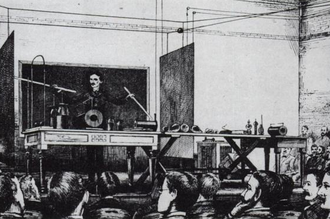
Tesla demonstrating wireless transmission by “electrostatic induction” during an 1891 lecture at Columbia College.  The two metal sheets are connected to a Tesla coil oscillator, which applies high-voltage radio frequency alternating current.  An oscillating electric field between the sheets ionizes the low-pressure gas in the two long Geissler tubes in his hands, causing them to glow, similar to neon tubes.

After 1890 inventor Nikola Tesla experimented with transmitting power by inductive and capacitive coupling using spark-excited radio frequency resonant transformers, now called Tesla coils, which generated high AC voltages.[35][37][105] Early on he attempted to develop a wireless lighting system based on near-field inductive and capacitive coupling[37] and conducted a series of public demonstrations where he lit Geissler tubes and even incandescent light bulbs from across a stage.[37][105][106] He found he could increase the distance at which he could light a lamp by using a receiving LC circuit tuned to resonance with the transmitter’s LC circuit.[36] using resonant inductive coupling.[37][38] Tesla failed to make a commercial product out of his findings[107] but the resonant inductive coupling used is now a familiar technology used throughout electronics and is currently being widely applied to short-range wireless power systems.[37][108]

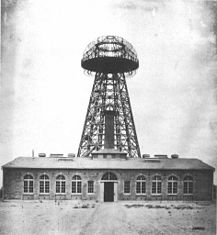
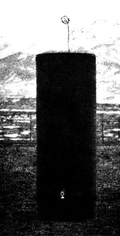
(left) Experiment in resonant inductive transfer by Tesla at Colorado Springs 1899. The coil is in resonance with Tesla’s magnifying transmitter nearby, powering the light bulb at bottom. (right) Tesla’s unsuccessful Wardenclyffe power station.

Tesla went on to develop a wireless power distribution system that he hoped would be capable of transmit power long distance directly into homes and factories. Early on he seemed to borrow from the ideas of Mahlon Loomis,[109][110] proposing a system composed of balloons to suspend transmitting and receiving electrodes in the air above 30,000 feet (9,100 m) in altitude, where he thought the pressure would allow him to send high voltages (millions of volts) long distances. To further study the conductive nature of low pressure air he set up a test facility at high altitude in Colorado Springs during 1899.[111][112][113] Experiments he conducted there with a large coil operating in the megavolts range, as well as observations he made of the electronic noise of lightning strikes, led him to incorrectly conclude[114][115] that he could use the entire globe of the Earth to conduct electrical energy. The theory included driving alternating current pulses into the Earth at its resonant frequency from a grounded Tesla coil working against an elevated capacitance to make the potential of the Earth oscillate. Tesla thought this would allowing alternating current to be received with a similar capacitive antenna tuned to resonance it at any point on Earth with very little power loss.[116][117][118] His observations also led him to believe a high voltage used in a coil at an elevation of a few hundred feet would “break the air stratum down”, eliminating the need for miles of cable hanging on balloons to create his atmospheric return circuit.[119][120] Tesla would go on the next year to propose a “World Wireless System” that was to broadcast both information and power worldwide[121][122] and attempted in 1901 to construct a large high-voltage wireless power station, now called the Wardenclyffe Tower, at Shoreham, New York. By 1904 investment dried up and the facility was never completed.

ADRUINO PROJECT

For this project you will need:

Part list for beginners:


Part list for ‘pro’ :

  • ATmega328p (with Arduino Bootloader)*
  • 28 pin DIP IC Socket
  • 16MHz Crystal Oscillator
  • 2x 22pF and 1x 100nF capacitors
  • 10K resistor
  • USB to Serial adapter**
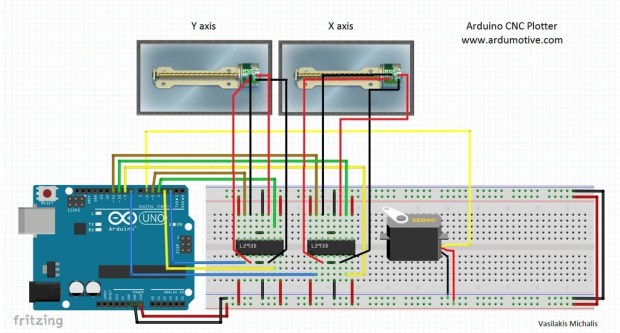
  • 2x L293D ICs
  • Mini Servo Motor
  • 2x DVD/CD Drives
  • Prototyping PCB Circuit Board Stripboard
  • 4x 2pins Screw Terminal Connector (or 2x 4 pins Screw Terminal Connector)***

*You will need also an Arduino UNO board to program the ATmega328 micro possessor

**USB to Serial adapter will allow the circuit to communicate with the computer through the USB cable, just like Arduino uno does.

***Why to use screw terminal connectors? Because you don’t want to solder and desolder cables from stepper motors until you find the correct working combination.

Tools (only for ‘pro’ part list):

  • Screwdriver
  • Soldering iron
  • Solder
  • Cutting tool (e.g. Dremel) (Optional for cutting plastic parts)
  • Glue
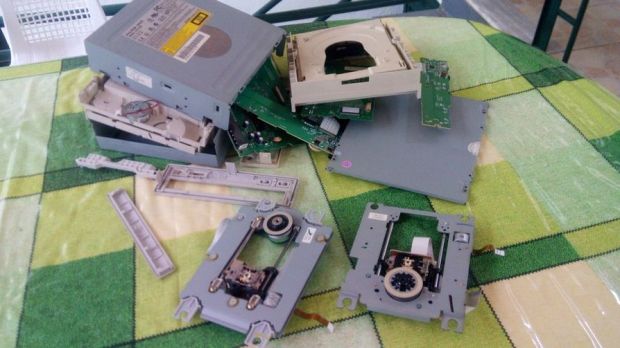
  • 565761458.jpg  First step to start building this cnc machine is to disassemble two dvd/cd drives and take off them the stepper motors. Use the screwdriver to open them and take off them the rails. Next step is to choose our base for this CNC machine. I used one surface from remaining dvd ‘garbage’ stuff.Finally we will need to find something to attach the one of the stepper-rails vertically to our construction. (you will understand what I mean in our next step) Watch the above image.adruino video
  • 5.jpg

my first college project

hi I m Kishore and I m planning to do my first college project with my friends….my projects is about 2d printers


For the circuit you will need:

Part list for beginners:

  • Arduino uno
  • Breadboard
  • 2x L293D ICs Motor driver
  • Mini Servo Motor
  • 2x DVD/CD Drives

Part list for ‘pro’ :

  • ATmega328p (with Arduino Bootloader)*
  • 28 pin DIP IC Socket
  • 16MHz Crystal Oscillator
  • 2x 22pF and 1x 100nF capacitors
  • 10K resistor
  • USB to Serial adapter**
  • 2x L293D ICs
  • Mini Servo Motor
  • 2x DVD/CD Drives
  • Prototyping PCB Circuit Board Stripboard
  • 4x 2pins Screw Terminal Connector (or 2x 4 pins Screw Terminal Connector)***

*You will also need an Arduino UNO board to program the ATmega328 micro controller.

**USB to Serial adapter will allow the circuit to communicate with the computer through the USB cable, just like Arduino uno does.

***Why to use screw terminal connectors? Because you don’t want to solder and desolder cables from stepper motors until you find the correct working combination!

For the mounting base:

  • One piece of plexiglass 20×16 cm (thickness 5mm) (for X axis)
  • Two pieces of plexiglass 14×4 cm (thickness 5mm) (for Y axis)
  • A few nut screws, nuts and shims (~20)
  • A few spacers
  • Four supporting angles (preferably plastic)

Instead of plexiglass you can also use wood, metal or parts from dissasembly cd/dvd drives

Tools:

  • Screwdriver
  • Soldering iron
  • Solder
  • Drill
  • Cutting tool (e.g. Dremel) (Optional for cutting plastic/plexiglass parts)
  • Glue

click thislink  CNC plotter  to see the video of it

CODE FOR CNC PLOTTER:

#include <Stepper.h>

#define LINE_BUFFER_LENGTH 512

// Should be right for DVD steppers, but is not too important here

const int stepsPerRevolution = 20;

// create servo object to control a servo

// Initialize steppers for X- and Y-axis using this Arduino pins for the L293D H-bridge

Stepper myStepperY(stepsPerRevolution, 2,3,4,5);

Stepper myStepperX(stepsPerRevolution, 6,7,8,9);

Stepper myStepperZ(stepsPerRevolution, 10,11,12,13);

/* Structures, global variables */

struct point {

float x;

float y;

float z;

};

// Current position of plothead

struct point actuatorPos;

// Drawing settings, should be OK

float StepInc = 1;

int StepDelay = 0;

int LineDelay = 50;

int penDelay = 50;

// Motor steps to go 1 millimeter.

// Use test sketch to go 100 steps. Measure the length of line.

// Calculate steps per mm. Enter here.

float StepsPerMillimeterX = 6;

float StepsPerMillimeterY = 6;

// Drawing robot limits, in mm

// OK to start with. Could go up to 50 mm if calibrated well.

float Xmin = 0;

float Xmax = 40;

float Ymin = 0;

float Ymax = 40;

float Zmin = 0;

float Zmax = 30;

float Xpos = Xmin;

float Ypos = Ymin;

float Zpos = Zmax;

// Set to true to get debug output.

boolean verbose = false;

// Needs to interpret

// G1 for moving

// G4 P300 (wait 150ms)

// M300 S30 (pen down)

// M300 S50 (pen up)

// Discard anything with a (

// Discard any other command!

/**********************

* void setup() – Initialisations

***********************/

void setup() {

// Setup

Serial.begin( 9600 );

// Decrease if necessary

myStepperX.setSpeed(60);

myStepperY.setSpeed(60);

myStepperZ.setSpeed(50);

// Set & move to initial default position

// TBD

// Notifications!!!

Serial.println(“Mini CNC Plotter alive and kicking!”);

Serial.print(“X range is from “);

Serial.print(Xmin);

Serial.print(” to “);

Serial.print(Xmax);

Serial.println(” mm.”);

Serial.print(“Y range is from “);

Serial.print(Ymin);

Serial.print(” to “);

Serial.print(Ymax);

Serial.println(” mm.”);

}

/**********************

* void loop() – Main loop

***********************/

void loop()

{

delay(200);

char line[ LINE_BUFFER_LENGTH ];

char c;

int lineIndex;

bool lineIsComment, lineSemiColon;

lineIndex = 0;

lineSemiColon = false;

lineIsComment = false;

while (1) {

// Serial reception – Mostly from Grbl, added semicolon support

while ( Serial.available()>0 ) {

c = Serial.read();

if (( c == ‘\n’) || (c == ‘\r’) ) { // End of line reached

if ( lineIndex > 0 ) { // Line is complete. Then execute!

line[ lineIndex ] = ‘\0’; // Terminate string

if (verbose) {

Serial.print( “Received : “);

Serial.println( line );

}

processIncomingLine( line, lineIndex );

lineIndex = 0;

}

else {

// Empty or comment line. Skip block.

}

lineIsComment = false;

lineSemiColon = false;

Serial.println(“ok”);

}

else {

if ( (lineIsComment) || (lineSemiColon) ) { // Throw away all comment characters

if ( c == ‘)’ ) lineIsComment = false; // End of comment. Resume line.

}

else {

if ( c <= ‘ ‘ ) { // Throw away whitepace and control characters

}

else if ( c == ‘/’ ) { // Block delete not supported. Ignore character.

}

else if ( c == ‘(‘ ) { // Enable comments flag and ignore all characters until ‘)’ or EOL.

lineIsComment = true;

}

else if ( c == ‘;’ ) {

lineSemiColon = true;

}

else if ( lineIndex >= LINE_BUFFER_LENGTH-1 ) {

Serial.println( “ERROR – lineBuffer overflow” );

lineIsComment = false;

lineSemiColon = false;

}

else if ( c >= ‘a’ && c <= ‘z’ ) { // Upcase lowercase

line[ lineIndex++ ] = c-‘a’+’A’;

}

else {

line[ lineIndex++ ] = c;

}

}

}

}

}

}

void processIncomingLine( char* line, int charNB ) {

int currentIndex = 0;

char buffer[ 64 ]; // Hope that 64 is enough for 1 parameter

struct point newPos;

newPos.x = 0.0;

newPos.y = 0.0;

// Needs to interpret

// G1 for moving

// G4 P300 (wait 150ms)

// G1 X60 Y30

// G1 X30 Y50

// M300 S30 (pen down)

// M300 S50 (pen up)

// Discard anything with a (

// Discard any other command!

while( currentIndex < charNB ) {

switch ( line[ currentIndex++ ] ) { // Select command, if any

case ‘U’:

penUp();

break;

case ‘D’:

penDown();

break;

case ‘G’:

buffer[0] = line[ currentIndex++ ]; // /!\ Dirty – Only works with 2 digit commands

// buffer[1] = line[ currentIndex++ ];

// buffer[2] = ‘\0’;

buffer[1] = ‘\0’;

switch ( atoi( buffer ) ){ // Select G command

case 0: // G00 & G01 – Movement or fast movement. Same here

case 1:

// /!\ Dirty – Suppose that X is before Y

char* indexX = strchr( line+currentIndex, ‘X’ ); // Get X/Y position in the string (if any)

char* indexY = strchr( line+currentIndex, ‘Y’ );

if ( indexY <= 0 ) {

newPos.x = atof( indexX + 1);

newPos.y = actuatorPos.y;

}

else if ( indexX <= 0 ) {

newPos.y = atof( indexY + 1);

newPos.x = actuatorPos.x;

}

else {

newPos.y = atof( indexY + 1);

indexY = ‘\0’;

newPos.x = atof( indexX + 1);

}

drawLine(newPos.x, newPos.y );

// Serial.println(“ok”);

actuatorPos.x = newPos.x;

actuatorPos.y = newPos.y;

break;

}

break;

case ‘M’:

buffer[0] = line[ currentIndex++ ]; // /!\ Dirty – Only works with 3 digit commands

buffer[1] = line[ currentIndex++ ];

buffer[2] = line[ currentIndex++ ];

buffer[3] = ‘\0’;

switch ( atoi( buffer ) ){

case 300:

{

char* indexS = strchr( line+currentIndex, ‘S’ );

float Spos = atof( indexS + 1);

// Serial.println(“ok”);

if (Spos == 30) {

penDown();

}

if (Spos == 50) {

penUp();

}

break;

}

case 114: // M114 – Repport position

Serial.print( “Absolute position : X = ” );

Serial.print( actuatorPos.x );

Serial.print( ” – Y = ” );

Serial.println( actuatorPos.y );

break;

default:

Serial.print( “Command not recognized : M”);

Serial.println( buffer );

}

}

}

}

/*********************************

* Draw a line from (x0;y0) to (x1;y1).

* Bresenham algo from https://www.marginallyclever.com/blog/2013/08/how-to-build-an-2-axis-arduino-cnc-gcode-interpreter/

* int (x1;y1) : Starting coordinates

* int (x2;y2) : Ending coordinates

**********************************/

void drawLine(float x1, float y1) {

if (verbose)

{

Serial.print(“fx1, fy1: “);

Serial.print(x1);

Serial.print(“,”);

Serial.print(y1);

Serial.println(“”);

}

// Bring instructions within limits

if (x1 >= Xmax) {

x1 = Xmax;

}

if (x1 <= Xmin) {

x1 = Xmin;

}

if (y1 >= Ymax) {

y1 = Ymax;

}

if (y1 <= Ymin) {

y1 = Ymin;

}

if (verbose)

{

Serial.print(“Xpos, Ypos: “);

Serial.print(Xpos);

Serial.print(“,”);

Serial.print(Ypos);

Serial.println(“”);

}

if (verbose)

{

Serial.print(“x1, y1: “);

Serial.print(x1);

Serial.print(“,”);

Serial.print(y1);

Serial.println(“”);

}

// Convert coordinates to steps

x1 = (int)(x1*StepsPerMillimeterX);

y1 = (int)(y1*StepsPerMillimeterY);

float x0 = Xpos;

float y0 = Ypos;

// Let’s find out the change for the coordinates

long dx = abs(x1-x0);

long dy = abs(y1-y0);

int sx = x0<x1 ? StepInc : -StepInc;

int sy = y0<y1 ? StepInc : -StepInc;

long i;

long over = 0;

if (dx > dy) {

for (i=0; i<dx; ++i) {

myStepperX.step(sx);

over+=dy;

if (over>=dx) {

over-=dx;

myStepperY.step(sy);

}

delay(StepDelay);

}

}

else {

for (i=0; i<dy; ++i) {

myStepperY.step(sy);

over+=dx;

if (over>=dy) {

over-=dy;

myStepperX.step(sx);

}

delay(StepDelay);

}

}

if (verbose)

{

Serial.print(“dx, dy:”);

Serial.print(dx);

Serial.print(“,”);

Serial.print(dy);

Serial.println(“”);

}

if (verbose)

{

Serial.print(“Going to (“);

Serial.print(x0);

Serial.print(“,”);

Serial.print(y0);

Serial.println(“)”);

}

// Delay before any next lines are submitted

delay(LineDelay);

// Update the positions

Xpos = x1;

Ypos = y1;

}

// Raises pen

void penUp() {

myStepperZ.step(stepsPerRevolution);

Zpos=Zmax;

if (verbose) {

Serial.println(“Pen up!”);

}

}

// Lowers pen

void penDown() {

myStepperZ.step(-stepsPerRevolution);

Zpos=Zmin;

if (verbose) {

Serial.println(“Pen down”)

}

and also I have searched a good making video for cncplotter:   https://youtu.be/fVMQNToplHc

NEUTRINO IN INDIA

Is the Neutrino Project a boon or bane to Tamil Nadu?

Will there be any environmental effects?

India-based Neutrino Observatory is going to be built in Tamil Nadu, in Bodi West hills. The INO website itself was informative in answering the question here.

I live in Kolar Gold Fields, where the previous neutrino experimental lab was located. The mine (BGML), where the experiments were conducted, 2000m underground, was shut down; and along with it, the TIFR facility had to leave too. We have had no environment related problems here. Touch wood.

Is it a bane? Why would you ask that?

  1. Radiation from the Lab could pose a threat to the biodiversity around. There will be no radiation emitting from the lab; the lab is that deep in the earth to keep out radiation (to study environmental neutrinos without the interference of cosmic radiation).
  2. The mountain may become unstable. As INO scientists have said, the lab will not affect the structural stability of the mountain. The tunnel will be tiny, when compared to the underground mines (with its numerous shafts) that was operational in KGF for more than a 100 years. While making the tunnel, the technological advancement will ensure that the environment is left untouched; at the most, the rock blasting will cause flutters, but that won’t last long, and normalcy will be restored in no time.
  3. There will be hazardous chemicals and gases. To ensure safety of the experiment and the people working in the lab (needless to mention, the environment and the people living nearby), the gases (which are not hazardous in their quantity and which comply with international standards) will be recycled many times and only then let off in controlled amounts. The equipment and the gases used for the experiment will be hermetically sealed, so there’s no chance of any pollution/contamination from there.


Is it a boon?

  1. Fundamental Science laboratory set up, and the scientists and students working in the lab, will inevitably mean a township will be created around the lab. This, as in any township (say, Powergrid, SAIL), will mean more employment for the people living nearby (labour, people who manage the day-to-day upkeep of the area), and more ‘demand’ in the market for goods and services (for example, the vegetable market, taxi services, ticket booking services etc).
  2. Setting up the laboratory itself means heavy employment opportunity in constructing it.
  3. The floating population of scientists in the lab will bring in a richer demand to the market around; maybe even tourism.
  4. The prospects of setting up research institutes around the lab are immense.
  5. Bodi West Hills just got put into the scientific community’s map. Should the lab yield substantive results..


To the people living nearby (the lab is now a typical site of construction; approach roads are being constructed right now), the lab simply means, in the words of an auto-rickshaw driver, “that industry that they’re constructing in the hills”.

NEUTRINO

Neutrino

Neutrino/Antineutrino
FirstNeutrinoEventAnnotated.jpg

The first use of a hydrogen bubble chamber to detect neutrinos, on 13 November 1970, at Argonne National Laboratory. A neutrino hits a proton in a hydrogen atom. The collision occurs at the point where three tracks emanate on the right of the photograph.
Composition Elementary particle
Statistics Fermionic
Generation First, second and third
Interactions Weak interaction and gravitation
Symbol ν
e,
ν
μ,
ν
τ,
ν
e,
ν
μ,
ν
τ
Antiparticle Antineutrinos are possibly identical to the neutrino (see Majorana fermion).
Theorized ν
e (Electron neutrino): Wolfgang Pauli (1930)

ν
μ (Muon neutrino): Late 1940s
ν
τ (Tau neutrino): Mid 1970s

Discovered ν
e: Clyde Cowan, Frederick Reines (1956)

ν
μ: Leon Lederman, Melvin Schwartz and Jack Steinberger (1962)

ν
τ: DONUT collaboration (2000)

Types 3 – electron neutrino, muon neutrino and tau neutrino
Mass 0.320 ± 0.081 eV/c2 (sum of 3 flavors)[1][2][3]
Electric charge e
Spin 1/2
Weak isospin LH: +1/2, RH: 0
Weak hypercharge LH: -1, RH: 0
BL −1
X −3

A neutrino (/nˈtrn/ or /njˈtrn/) (denoted by the Greek letter ν) is a fermion (an elementary particle with half-integer spin) that interacts only via the weak subatomic force[4] and gravity. The mass of the neutrino is much smaller than that of the other known elementary particles.

The neutrino is so named because it is electrically neutral—it is not affected by the electromagnetic force—and because its rest mass is so small (-ino) that it was originally thought to be zero. The weak force is a very short-range interaction, gravity is extremely weak on the subatomic scale, and neutrinos, as leptons, do not participate in the strong interaction. Thus, neutrinos typically pass through normal matter unimpeded and undetected.

Neutrinos come in three flavors: electron neutrinos (
ν
e), muon neutrinos (
ν
μ), and tau neutrinos (
ν
τ), associated with the electron, muon, and tau, respectively. Each neutrino also has a corresponding antiparticle, called an antineutrino, which also has no electric charge and half-integer spin. Neutrinos are produced such that there is no overall change in lepton number; that is, electron neutrinos are produced together with positrons (anti-electrons), and electron antineutrinos are produced with electrons.[5][6][7]

Neutrinos can be created in several ways, including in certain types of radioactive decay, in nuclear reactions such as those that take place in a star, in nuclear reactors, when cosmic rays hit atoms, and in supernovae. The majority of neutrinos in the vicinity of the Earth are from nuclear reactions in the Sun. About 65 billion (7010650000000000000♠6.5×10¹⁰) solar neutrinos per second pass through every square centimeter perpendicular to the direction of the Sun in the region of the Earth.[8]

Neutrinos oscillate between different flavors in flight. That is, an electron neutrino produced in a beta decay reaction may arrive in a detector as a muon or tau neutrino. This oscillation requires that the different neutrino flavors have different masses, and although the value of the masses is not known, experiments have shown that these masses are tiny. From cosmological measurements, it has been calculated that the sum of the three neutrino masses must be less than one millionth that of the electron.[9]

There are several active research areas involving the neutrino. Large neutrino detectors near nuclear reactors or in neutrino beams from particle accelerators attempt to measure the neutrino masses and determine the precise values for the magnitude and rates of oscillations between neutrino flavors. These experiments are also searching for the existence of CP violation in the neutrino sector; that is, whether or not the laws of physics treat neutrinos and antineutrinos differently. Many are looking for evidence of a sterile neutrino, a fourth neutrino flavor that does not interact with matter like the three known neutrino flavors. There are also experiments searching for neutrinoless double-beta decay, which, if it exists, would require that the neutrino and antineutrino are really the same particle. Then there are solar and cosmic neutrino experiments, which use neutrinos from space to understand the universe around us. Neutrinos are also the only identified candidate for dark matter, specifically hot dark matter

secondary function generators

Function Generators
A function generator is a signal source that has the capability of producing different types of waveforms as its output signal. The most common output waveforms are sine-waves, triangular waves, square waves, and sawtooth waves. The frequencies of such waveforms may be adjusted from a fraction of a hertz to several hundred kHz.
Actually the function generators are very versatile instruments as they are capable of producing a wide variety of waveforms and frequencies. In fact, each of the waveform they generate are particularly suitable for a different group of applications. The uses of sinusoidal outputs and square-wave outputs have already been described in the earlier Arts. The triangular-wave and sawtooth wave outputs of function generators are commonly used for those applications which need a signal that increases (or reduces) at a specific linear rate. They are also used in driving sweep oscillators in oscilloscopes and the X-axis of X-Y recorders.
Many function generators are also capable of generating two different waveforms simultaneously (from different output terminals, of course). This can be a useful feature when two generated signals are required for particular application. For instance, by provid­ing a square wave for linearity measurements in an audio-system, a simultaneous sawtooth output may be used to drive the horizontal deflection amplifier of an oscilloscope, providing a visual display of the measurement result. For another example, a triangular-wave and a sine-wave of equal frequencies can be produced simultaneously. If the zero crossings of both the waves are made to occur at the same time, a linearly varying waveform is available which can be started at the point of zero phase of a sine-wave.
Another important feature of some function generators is their capability of phase-locking to an external signal source. One function generator may be used to phase lock a second function generator, and the two output signals can be displaced in phase by an adjustable amount. In addition, one function generator may be phase locked to a harmonic of the sine-wave of another function generator. By adjustment of the phase and the amplitude of the
harmonics, almost any waveform may be produced by the summation of the fundamental frequency generated by one function generator and the harmonic generated by the other function generator. The function generator can also be phase locked to an accurate fre­quency standard, and all its output waveforms will have the same frequency, stability, and accuracy as the standard.
Function Generator Block Diagram
The block diagram of a function generator is given in figure. In this instrument the frequency is controlled by varying the magnitude of current that drives the integrator. This instrument provides different types of waveforms (such as sinusoidal, triangular and square waves) as its output signal with a frequency range of 0.01 Hz to 100 kHz.
The frequency controlled voltage regulates two current supply sources. Current supply source 1 supplies constant current to the integrator whose output voltage rises linearly with time. An increase or decrease in the current increases or reduces the slope of the output voltage and thus controls the frequency.
The voltage comparator multivibrator changes state at a predetermined maximum level, of the integrator output voltage. This change cuts-off the current supply from supply source 1 and switches to the supply source 2. The current supply source 2 supplies a reverse current to the integrator so that its output drops linearly with time. When the output attains a pre­determined level, the voltage comparator again changes state and switches on to the current supply source. The output of the integrator is a triangular wave whose frequency depends on the current supplied by the constant current supply sources. The comparator output provides a square wave of the same frequency as output. The resistance diode network changes the slope of the triangular wave as its amplitude changes and produces a sinusoidal wave with less than 1% distortion

cathode ray oscilloscope

Cathode Ray Oscilloscope
The cathode Ray Oscilloscope or mostly called as CRO is an electronic device used for giving the visual indication of a signal waveform.
It is an extremely useful and the most versatile instrument in the electronic industry.
CRO is widely used for trouble shooting radio and television receivers as well as for laboratory research and design.
Using a CRO , the wave shapes of alternating currents and voltages can be studied. It can also be used for measuring voltage, current, power, frequency and phase shift. Different types of oscilloscopes are available in the market for various purposes.
Block Diagram of CRO (Cathode Ray Oscilloscope)
The figure below shows the block diagram of a general purpose CRO .
As we can see from the above figure above, a CRO employs a cathode ray tube ( CRT) ,which acts as the heart of the oscilloscope.
In an oscilloscope, the CRT generates the electron beam which are accelerated to a high velocity and brought to focus on a fluorescent screen. This screen produces a visible spot where the electron beam strikes it. By deflecting the beam over the screen in response to the electrical signal, the electrons can be made to act as an electrical pencil of light which produces a spot of light wherever it strikes.
For accomplishing these tasks various electrical signals and voltages are needed, which are provided by the power supply circuit of the oscilloscope.
Low voltage supply is required for the heater of the electron gun to generate the electron beam and high voltage is required for the cathode ray tube to accelerate the beam. Normal voltage supply is required for other control units of the oscilloscope.
Horizontal and vertical deflection plates are fitted between the electron gun and the screen so that these can deflect the beam according to the input signal.
To deflect the electron beam on the screen in horizontal direction i.e. X-axis with constant time dependent rate, a time base generator is provided in the oscilloscope.
The signal to be viewed is supplied to the vertical deflection plate through the vertical amplifier, so that it can amplify the signal to a level that will provide usable deflection of the electron beam.
As the electron beam is deflected in X-axis as well as Y-axis, a triggering circuit is provided for synchronizing these two types of deflections so that horizontal deflection starts at the same point of the input vertical signal each time it sweeps.
Since CRT is the heart of the oscilloscope, we are going to discuss its various components in detail.
Cathode Ray Tube
The cathode ray tube or CRT is a vacuum tube of special geometrical shape which converts an electrical signal into a visual one.
A CRT makes available a large number of electrons which are accelerated to high velocity and are brought to focus on a fluorescent screen where it produces a spot when strikes it. The electron beam is deflected during its journey in response to the applied electrical signal. As a result, the electrical signal waveform is displayed visually.
The figure below shows various parts of a cathode ray tube (CRT) .

Now we will discuss each part of the CRT in detail.
(i) Glass Envelope
It is a conical highly evacuated glass housing which maintains vacuum inside it and supports various electrodes.
The inner wall of CRT between the neck and screen are usually coated with a conducting material known as aquadag. This coating is electrically connected to the accelerating anode so that the electrons which accidentally strike the walls are returned to the anode. This prevents the walls from charging to a high negative potential.
(ii) Electron Gun Assembly
The electron gun assembly consists of an indirectly heated cathode, a control grid, a focussing anode and an accelerating anode and it is used to produce a focused beam of electrons.
The control grid is held at negative potential w.r.t. cathode. However, the two anodes are held at high positive potential w.r.t. cathode.
The cathode consists of a nickel cylinder coated with oxide coating and provides a large number of electrons.
The control grid encloses the cathode and consists of a metal cylinder with a tiny circular opening to keep the electron beam small.
By controlling the positive potential on it,the focusing anode focuses the electron beam into a sharp pin point.
Due to the positive potential of about 10,000 V on the accelerating anode which is much larger than on the focusing diode, the electron beam is accelerated to a high velocity.
In this way, the electron gun assembly forms a narrow, accelerated electron beam which produces a spot of light when it strikes the screen.
(iii) Deflection Plate Assembly
It consists of two sets of deflecting plates within the tube beyond the accelerating anode and is used for the deflection of the beam.
One set is called as vertical deflection plates and the other set is called horizontal deflection plates.
The vertical deflection plates are mounted horizontally in the tube. On application of proper potential to these plates, the electron beam can be made to move up and down vertically on the screen.
The horizontal deflection plates are mounted vertically in the tube. On application of proper potential to these plates, the electron beam can be made to move right and left horizontally on the screen.
(iv) Screen
The screen is coated with some fluorescent materials such as zinc orthosilicate, zinc oxide etc and is the inside face of the tube.
When high velocity electron beam strikes the screen, a spot of light appears at the point of impact. The colour of the spot depends upon the nature of fluorescent material.
Working of Cathode Ray Tube
As the cathode is heated, it produces a large number of electrons.
These electrons pass through the control grid on their way to the screen.
The control grid controls the amount of current flow as in standard vacuum tubes. If negative potential on the control grid is high, fewer electrons will pass through it. Hence the electron beam will produce a dim spot of light on striking the screen. Reverse will happen when the negative potential on the control grid is reduced.
Therefore, the intensity of the light spot on the screen can be controlled by changing the negative potential on the control grid.
After leaving the control grid, the electron beam comes under the influence of focusing and accelerating anodes.
Since, the two anodes are at high positive potential, therefore, they produce a field which acts as electrostatic lens to converge the electron beam at a point on the screen.
After leaving the accelerating anode, the electron beam comes under the influence of vertical and horizontal deflection plates.
When no voltage is applied to these deflection plates, the electron beam produces a spot of light at the centre as shown by point O in fig below on the screen.

If the voltage is applied to the vertical deflection plates only, the electron beam and so as the spot of light will be deflected upwards i.e. point O1. Ans if the potential on the plates is reversed, the spot of light will be deflected downwards i.e. point O2.
Similarly, the spot of light can be deflected horizontally by applying voltage across the horizontal deflection plates